Appearance
Modern Report
A modern report template, pre-populated with data for a PropTech report but widely reusable for modern reporting.
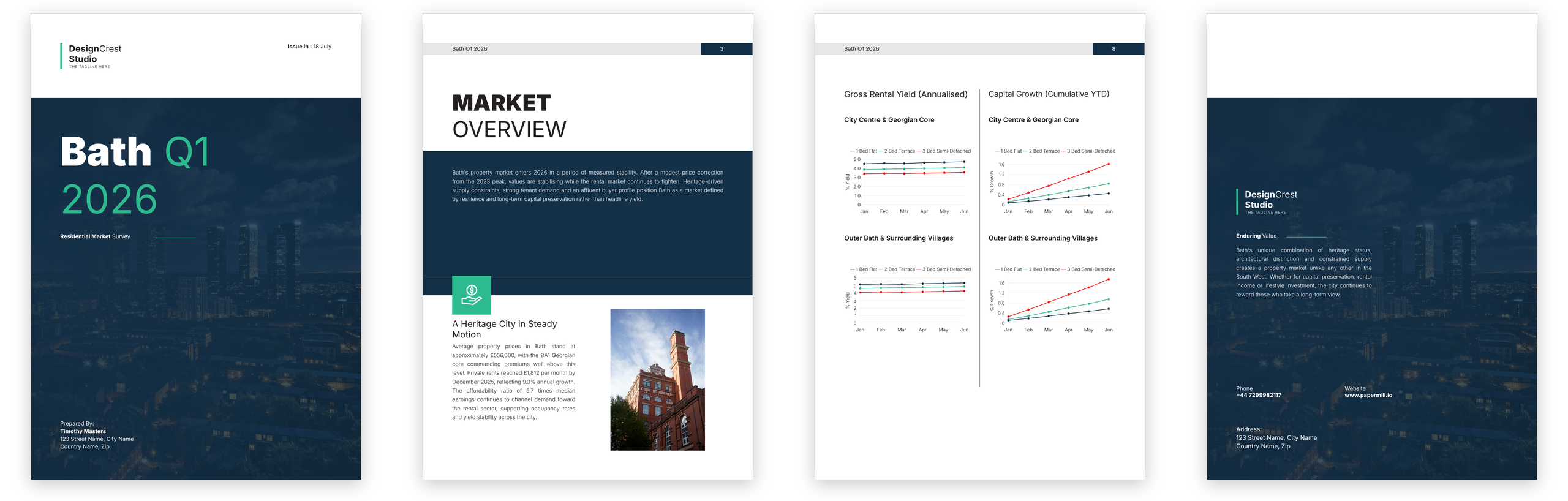
Key Features
This extensive template uses a combination of long markdown flows and JSON for most of the document. For the financials flow, it uses the Press language instead, as it relies heavily on repetition and a grid layout. It also incorporates visualisations generated by Papermill directly from JSON data.
Template Source
Copy and paste this source into the Papermill editor to preview the template.
Details
xml
<press>
<document format="A4" page-margin-top="1.85cm">
<!-- we're going to always try to land on a right page when starting a new section -->
<coverpage />
<!-- <blank-left /> -->
<repeat flow="toc-flow">
<toc-right />
<!-- <toc-left /> -->
</repeat>
<!-- introduction -->
<intro />
<!-- <intro-left /> -->
<repeat flow="intro">
<intro-right />
<!-- <intro-left /> -->
</repeat>
<repeat flow="methodology">
<method-right />
<!-- <method-left /> -->
</repeat>
<repeat flow="financials">
<finance-right />
<!-- <finance-left /> -->
</repeat>
<surveyor-right />
<!-- on left back page now -->
<back-matter />
</document>
<pages>
<coverpage>
<frame width="fill" direction="row" padding-left="1.85cm" padding-right="1.85cm" padding-bottom="1.85cm">
<logo />
<frame h-align="right" text-align="right">
<b>Issue:</b> {{ data.issueDate }}
</frame>
</frame>
<frame width="fill" height="fill" padding="1.85cm">
<img right="0" bottom="0" width="fill" src="{{assets.data.baseUrl}}/splash.png" />
<frame left="0" top="0" width="fill" height="fill" background-color="#143047CC" />
<frame style="@coverTitle" width="75%" height="180pt" space-after-desired="12pt">
<markdown inline="true">{{ data.title }}</markdown>
</frame>
<frame height="fill" font-color="white" width="47%" direction="row">
<frame space-after-desired="8pt">
<markdown inline="true">{{ data.cover.subtitle }}</markdown>
</frame>
<frame width="fill" padding-top="6pt">
<hr />
</frame>
</frame>
<frame width="35%" font-color="white" line-height="1.4">
<frame>Prepared By:</frame>
<frame><b>{{ data.author.name }}</b></frame>
<frame>{{ data.author.address }}</frame>
<frame>{{ data.author.postcode }}</frame>
</frame>
</frame>
</coverpage>
<blank-left>
<header-left />
</blank-left>
<toc-right deferred="true">
<header-right />
<frame space-after-desired="72pt" />
<frame height="fill" width="fill" padding="1.85cm" padding-top="1.4cm" padding-bottom="1.4cm"
background-color="primary">
<flow deferred="true">
<h1 font-color="white"><b>CONTENTS</b></h1>
</flow>
<frame direction="row" width="fill" height="fill" space-before-desired="40pt" font-color="white">
<frame width="fill" height="fill">
<flow name="toc-flow" />
</frame>
<frame width="26pt" />
<frame width="fill" height="fill">
<flow name="toc-flow" />
</frame>
</frame>
</frame>
<frame space-before-desired="72pt" width="fill" padding-bottom="1.85cm" padding-left="1.85cm"
padding-right="1.85cm" max-height="8.2cm" padding-top="1.4cm">
<flow name="contents-footer" />
</frame>
</toc-right>
<toc-left deferred="true">
<header-left />
<frame space-after-desired="72pt" />
<frame height="fill" width="fill" padding="1.85cm" padding-top="1.4cm" padding-bottom="1.4cm">
<frame direction="row" width="fill" height="fill" space-before-desired="40pt" font-color="primary">
<frame width="fill" height="fill">
<flow name="toc-flow" />
</frame>
<frame width="26pt" />
<frame width="fill" height="fill">
<flow name="toc-flow" />
</frame>
</frame>
</frame>
<frame space-before-desired="72pt" width="fill" padding-bottom="1.85cm" padding-left="1.85cm"
padding-right="1.85cm" max-height="8.2cm" padding-top="1.4cm">
<flow name="contents-footer" />
</frame>
</toc-left>
<intro padding-bottom="1.85cm">
<header-right />
<frame padding-left="1.85cm" padding-right="1.85cm" padding-top="2.2cm">
<h1 width="80%">
<markdown inline="true">{{ data.sections.intro.title }}</markdown>
</h1>
</frame>
<frame height="fill" v-align="bottom">
<frame width="fill" padding-left="1.85cm" padding-right="1.85cm" padding-top="1.1cm" font-color="white"
font-size="10pt" line-height="1.6" background-color="primary" font-weight="light" min-height="226pt">
<repeat data="data.sections.intro.summary" item="para">
<p>
<markdown inline="true">{{ para }}</markdown>
</p>
</repeat>
</frame>
</frame>
<frame>
<frame height="35pt" width="fill" background-color="primary" />
<frame padding-top="42pt" padding-left="1.85cm" padding-right="1.85cm" padding-bottom="1.85cm" width="55%">
<h2 space-after-desired="4pt">{{ data.sections.intro.subtitle }}</h2>
<p space-before-desired="0">{{ data.sections.intro.body }}</p>
</frame>
<img top="0" left="1.85cm" width="70pt" src="{{assets.data.baseUrl}}/icon-intro.png" />
</frame>
<frame right="1.85cm" bottom="1.85cm" max-height="256pt" width="40%" h-align="center">
<img src="{{assets.data.baseUrl}}/intro-splash.jpg" />
</frame>
</intro>
<intro-left padding-bottom="1.85cm">
<header-left />
<frame padding-left="1.85cm" padding-right="1.85cm" padding-top="1.4cm">
<flow name="intro" />
</frame>
</intro-left>
<intro-right>
<header-right />
<frame padding-left="1.85cm" padding-right="1.85cm" padding-top="1.4cm">
<flow name="intro" />
</frame>
</intro-right>
<method-right padding-bottom="1.85cm">
<header-right />
<frame padding-left="1.85cm" padding-right="1.85cm" padding-top="2.2cm" height="fill">
<flow name="method-heading">
<h1>
<markdown inline="true">{{ data.sections.methodology.title }}</markdown>
</h1>
</flow>
<frame direction="row" width="fill" height="fill">
<frame width="fill">
<flow name="methodology" />
</frame>
<frame width="32pt" />
<frame width="fill">
<flow name="methodology" />
</frame>
</frame>
</frame>
<frame padding-left="1.85cm">
<flow name="method-banner">
<frame padding-top="12pt">
<frame padding-left="0.7cm" padding-right="1.85cm" padding-top="0.7cm" padding-bottom="0.7cm"
direction="row" v-align="center" background-color="primary" font-color="white">
<frame padding="0.2cm">
<img src="{{ assets.data.baseUrl }}/megaphone.png" width="24pt" />
</frame>
<p>
{{ data.sections.methodology.banner }}
</p>
</frame>
</frame>
</flow>
</frame>
</method-right>
<method-left padding-bottom="1.85cm">
<header-left />
<frame padding-left="1.85cm" padding-right="1.85cm" padding-top="2.2cm" height="fill">
<frame direction="row" width="fill" height="fill">
<frame width="fill">
<flow name="methodology" />
</frame>
<frame width="24pt" />
<frame width="fill">
<flow name="methodology" />
</frame>
</frame>
</frame>
</method-left>
<finance-right padding-bottom="1.85cm">
<header-right />
<frame padding-left="1.85cm" padding-right="1.85cm" padding-top="2.2cm" padding-bottom="24pt">
<flow name="finance-heading">
<h1>
<markdown inline="true">{{ data.sections.financials.title }}</markdown>
</h1>
</flow>
</frame>
<frame padding-left="1.5cm" padding-right="1.5cm">
<flow name="financials" />
</frame>
</finance-right>
<finance-left padding-bottom="1.85cm">
<header-left />
<frame padding-left="1.5cm" padding-right="1.5cm" padding-top="2.2cm">
<flow name="financials" />
</frame>
</finance-left>
<surveyor-right padding-bottom="0">
<header-right />
<frame padding-left="1.85cm" padding-right="1.85cm" padding-top="2.2cm">
<flow name="survey-heading">
<h1>
<markdown inline="true">{{ data.sections.surveyor.title }}</markdown>
</h1>
</flow>
<frame>
<flow name="surveyor-intro" />
</frame>
</frame>
<frame direction="row" space-before-desired="1cm" padding-top="1cm" padding-left="1.85cm" padding-right="1.85cm"
padding-bottom="1.4cm" background-color="primary" font-color="white">
<frame width="fill">
<img width="64pt" src="{{assets.data.baseUrl}}/icon-scales.png" />
<h2 space-after-desired="2pt">{{ data.sections.surveyor.column1Title }}</h2>
<frame>
<flow name="surveyor-sales" />
</frame>
</frame>
<frame width="32pt" />
<frame width="fill">
<img width="64pt" src="{{assets.data.baseUrl}}/icon-graph.png" />
<h2 space-after-desired="2pt">{{ data.sections.surveyor.column2Title }}</h2>
<frame>
<flow name="surveyor-lettings" />
</frame>
</frame>
</frame>
</surveyor-right>
<back-matter>
<frame width="fill" direction="row" padding-left="1.85cm" padding-right="1.85cm" padding-bottom="1.85cm"
height="3.5cm">
</frame>
<frame width="fill" height="fill" padding="1.85cm" padding-top="5.8cm" font-color="white">
<img right="0" bottom="0" width="fill" src="{{assets.data.baseUrl}}/splash.png" />
<frame left="0" top="0" width="fill" height="fill" background-color="#143047CC" />
<logo />
<frame font-color="white" space-before-desired="32pt" height="fill" width="50%">
<frame direction="row">
<frame space-after-desired="8pt">
<markdown inline="true">{{ data.backMatter.tagline }}</markdown>
</frame>
<frame width="fill" padding-top="6pt">
<hr />
</frame>
</frame>
<p>
{{ data.backMatter.description }}
</p>
</frame>
<frame space-after-desired="48pt" direction="row" width="80%">
<frame width="fill">
<frame>Phone</frame>
<frame><b>{{ data.contact.phone }}</b></frame>
</frame>
<frame width="fill">
<frame>Website</frame>
<frame><b>{{ data.contact.website }}</b></frame>
</frame>
</frame>
<frame width="35%" font-color="white" line-height="1.4" font-size="11pt">
<frame>Address:</frame>
<frame>{{ data.contact.address }}</frame>
<frame>{{ data.contact.postcode }}</frame>
</frame>
</frame>
</back-matter>
</pages>
<assets>
<colors>
<primary>#143047</primary>
<accent>#2DBA8F</accent>
<text-black>#231F20</text-black>
<grey>#E6E7E9</grey>
</colors>
<data type="json">
{
"baseUrl": "https://examples.papermill.io/proptech-whitepaper"
}
</data>
</assets>
<styles>
<document>
<text-align>justified</text-align>
<font>Lato</font>
<font-color>text-black</font-color>
<font-size>10pt</font-size>
</document>
<plot>
<font-size>8.5pt</font-size>
<font-weight>light</font-weight>
<space-before-desired>8pt</space-before-desired>
<space-after-desired>16pt</space-after-desired>
</plot>
<legend>
<font-size>10pt</font-size>
<font-weight>light</font-weight>
</legend>
<h1>
<text-align>left</text-align>
<width>350pt</width>
<font-size>40pt</font-size>
<child name="b">
<font-weight>black</font-weight>
</child>
<child name="strong">
<font-weight>black</font-weight>
</child>
<font>Roboto</font>
<space-after-desired>22pt</space-after-desired>
</h1>
<p>
<font-weight>light</font-weight>
<font-size>10pt</font-size>
<line-height>1.6</line-height>
<space-before-desired>12pt</space-before-desired>
<space-after-desired>12pt</space-after-desired>
<hyphens>true</hyphens>
<text-align>justify</text-align>
</p>
<h2>
<text-align>left</text-align>
<font-size>16pt</font-size>
<font>Roboto</font>
<space-before-desired>16pt</space-before-desired>
<space-after-desired>16pt</space-after-desired>
</h2>
<h3>
<text-align>left</text-align>
<font-size>12pt</font-size>
<font>Roboto</font>
<space-before-desired>16pt</space-before-desired>
<space-after-desired>8pt</space-after-desired>
<font-weight>semibold</font-weight>
<child name="strong">
<font-weight>black</font-weight>
</child>
<child name="b">
<font-weight>black</font-weight>
</child>
<font>Roboto</font>
</h3>
<h4>
<font>Roboto</font>
</h4>
<h5>
<font>Roboto</font>
</h5>
<h6>
<font>Roboto</font>
</h6>
<hr>
<space-before-desired>8pt</space-before-desired>
<space-after-desired>8pt</space-after-desired>
<color>accent</color>
</hr>
<alias name="plain-markdown">
<child name="strong">
<font-weight>regular</font-weight>
</child>
<child name="em">
<font-style>normal</font-style>
</child>
</alias>
<alias name="coverTitle">
<text-align>left</text-align>
<font-size-max>72pt</font-size-max>
<font-size>fit</font-size>
<font-color>accent</font-color>
<child name="strong">
<font-weight>black</font-weight>
<font-color>white</font-color>
</child>
<child name="b">
<font-weight>black</font-weight>
<font-color>white</font-color>
</child>
</alias>
</styles>
<components>
<logo>
<frame border-color="accent" border-weight-left="4pt" padding-left="12pt" width="fill">
<frame font-size="16pt">
<markdown inline="true">{{ data.company.name }}</markdown>
</frame>
<frame font-size="7pt" tracking="0.1" font-weight="light" case="upper">{{ data.company.tagline }}</frame>
</frame>
</logo>
<template top="0" left="0" width="fill" height="fill" page="1">
<img width="fill" height="fill" src="{{assets.data.baseUrl}}/pages/{{attrs.page}}.png" />
<frame width="fill" height="fill" top="0" left="0" background-color="#FFFFFF44" />
</template>
<header-left width="fill" direction="row" height="0.75cm">
<frame height="fill" v-align="center" width="3.3cm" padding-left="1.85cm" background-color="primary"
font-size-max="10pt" font-size-min="7pt" font-size="fit" font-color="white">
<page-number />
</frame>
<frame height="fill" v-align="center" width="fill" padding-right="1.85cm" background-color="grey"
font-size-max="10pt" font-size-min="7pt" font-size="fit" font-color="text-black" text-align="right"
h-align="right" style="@plain-markdown">
<markdown inline="true">{{ data.title }}</markdown>
</frame>
</header-left>
<header-right width="fill" direction="row" height="0.75cm">
<frame height="fill" v-align="center" width="fill" padding-left="1.85cm" background-color="grey"
font-size-max="10pt" font-size-min="7pt" font-size="fit" font-color="text-black" text-align="left"
h-align="left" style="@plain-markdown">
<markdown inline="true">{{ data.title }}</markdown>
</frame>
<frame height="fill" v-align="center" width="3.3cm" padding-right="1.85cm" background-color="primary"
font-size-max="10pt" font-size-min="7pt" font-size="fit" font-color="white" text-align="right" h-align="right">
<page-number />
</frame>
</header-right>
<plot plotindex="0" y-label="%">
<visualization data="plot.data">
<!-- plot customization, we set colours to those defined in assets -->
<config>
<colors>
<color>primary</color>
<color>accent</color>
<color>red</color>
<color>blue</color>
<color>green</color>
</colors>
</config>
<frame>
<legend width="100%" direction="row" row-wrap="true" padding-top="12pt" font-weight="light" h-align="left"
text-align="left">
<repeat data="visualization.groups" item="group">
<frame padding-right="8pt" direction="row" h-align="center">
<frame padding-right="4pt"><span font-color="{{ group.color }}">—</span></frame>
<frame>{{ group.name }}</frame>
</frame>
</repeat>
</legend>
<line-plot height="4cm" width="100%" label-y="{{ attrs['y-label'] }}" />
</frame>
</visualization>
</plot>
</components>
<flows>
<toc-flow deferred="true">
<repeat outline="headings" item="h1">
<frame height="107pt">
<frame font-size="16pt">
<value pad="2">{{ h1['page-number'] }}</value>
</frame>
<hr />
<frame font-size="12pt">
{{ h1['text-content'] }}
</frame>
<frame font-size="9pt" line-height="1.8" space-before-desired="4pt" width="fill" text-align="justified">
{{ data.toc.entryDescription }}
</frame>
</frame>
</repeat>
</toc-flow>
<contents-footer deferred="true">
<h1 outline="meta" width="60%" font-size-max="26pt" font-size="fit" font-size-min="16pt"
space-after-desired="16pt" style="@plain-markdown">
<markdown inline="true">{{
data.title }}</markdown>
</h1>
<p font-size="10pt" line-height="1.6">{{ data.toc.footerDescription }}</p>
</contents-footer>
<intro type="markdown">
Manchester's housing market entered 2026 on a firm footing, continuing the steady growth trajectory that has defined the city's property landscape over recent years. As of early 2026, the average house price in Manchester stands at approximately £252,000–£258,000, reflecting annual growth of around 3–5% depending on the measure used. Private rents have also continued to climb, reaching an average of £1,343 per month in January 2026 — a 3.2% increase year-on-year, according to ONS data. The rental market has been particularly active in the city centre and Salford Quays corridor, where one-bedroom apartments now command average monthly rents of £1,050–£1,150, while two-bedroom units in purpose-built developments regularly achieve £1,350–£1,500. Tenant demand continues to outstrip available stock, with void periods falling to an average of just 12 days across professionally managed portfolios — down from 18 days at the same point in 2025. This tightening is most pronounced in postcodes within walking distance of major employment hubs such as Spinningfields, MediaCityUK, and the Oxford Road knowledge corridor.
The fundamentals underpinning this performance remain robust. Manchester's population is expected to reach roughly 635,000 this year, driven by strong internal migration and high graduate retention from the city's three major universities. The jobs market continues to expand, with Greater Manchester projected to add nearly 60,000 new roles by 2028 across sectors including finance, technology, media, and life sciences. On the supply side, constraints persist. The city's five-year housing requirement stands at over 21,000 dwellings, yet annual completions have consistently fallen short of that target. This imbalance between supply and demand, combined with major regeneration programmes in districts such as Victoria North, Ancoats, and Hulme, continues to support both price growth and rental yields that outperform much of the UK. Infrastructure investment is further reinforcing the city's appeal: the Bee Network expansion, HS2 preparatory works at Manchester Piccadilly, and the continued build-out of the Northern Gateway are all expected to drive localised price appreciation in adjacent neighbourhoods over the medium term.
Looking ahead through 2026, industry forecasters including JLL and Savills project further price increases in the range of 4–5.5%, with rental values expected to grow by around 4% annually. Gross yields in the city centre are holding steady at 6.8–7.4% for one-bedroom apartments, comfortably ahead of the national average and well above equivalent yields in London or the South East. Capital growth, while more moderate than the exceptional gains seen in 2021–2022, remains positive across all property types, with three-bedroom semi-detached homes in outer boroughs showing the strongest cumulative appreciation year-to-date. While the pace of headline growth may moderate compared to recent peaks, Manchester remains one of the UK's most resilient and investable regional property markets. This report examines the key trends, data, and outlook shaping the Manchester housing market in Q1 2026, drawing on ONS indices, Land Registry transaction data, and proprietary lettings benchmarks to present a comprehensive view of current market conditions.
</intro>
<methodology type="markdown">
Evelicaero int aut et ut es nobis denimin ratem aditibe rovidente aut mo quatem faccum quisquodio. Tatis
excerferios
ducillant. Voluptint quisquisquas alis se sit, non pel estrunt sitia.

### Insert Your Title Here
Naomm eoms vendae consecu santurluptat laccupt
atecati aecatem quo et rem eomx et ilibus, nimilibus
busaestiur abora quunt endanihilis di dus, us, quibust
ioriam a nonsed quis eosti occulla ceperro reperepe
repraestorum eum cuptatem.
Siaboremquo corisciis ere ducima ipsanih itaturi
busaestiur abora quunt endanihilis di dus, us, quibust
ioriam a nonsed quis eosti occulla ceperro reperepe
mil modit as digname volori aborrov itiam, soluptm.
Dite volupta tiorest quiate ratist lis quam volesti nvenihicil int od enimagn imusapis im is aut lania
venihit,
adit quaturi taquias dolorectatia pelessi voles reri auda nobit provit, eatur aute volorest lia autem el
molenias.

### Insert Your Title Here
Naomm eoms vendae consecu santurluptat laccupt
atecati aecatem quo et rem eomx et ilibus, nimilibus
busaestiur abora quunt endanihilis di dus, us, quibust
ioriam a nonsed quis eosti occulla ceperro reperepe
repraestorum eum cuptatem.
Siaboremquo corisciis ere ducima ipsanih itaturi
busaestiur abora quunt endanihilis di dus, us, quibust
ioriam a nonsed quis eosti occulla ceperro reperepe
mil modit as digname volori aborrov itiam, soluptm.
</methodology>
<financials>
<repeat data="data.financials.sections" item="section">
<frame padding-left="12pt" padding-right="12pt" prevent-last="true" space-before-desired="40pt"
space-after-desired="12pt">
<h2 max-height="32pt" font-size-max="18pt" font-size="fit" font-size-min="14pt">{{
section.heading }}</h2>
</frame>
<grid columns="2">
<repeat data="section.plots" item="plot">
<frame padding="12pt">
<h3 show-if="plot.title">{{ plot.title }}</h3>
<plot y-label="{{ plot.yAxis }}" />
</frame>
</repeat>
</grid>
</repeat>
</financials>
<surveyor-intro type="markdown">
Evelicaero int aut et ut es nobis denimin ratem aditibe rovidente aut mo quatem faccum quisquodio. Tatis
excerferios
ducillant.dite volupta tiorest quiate ratist lis quam volesti nvenihicil int od enimagn imusapis im is aut lania
venihit, adit
quaturi taquias dolorectatia pelessi voles reri auda nobit provit, eatur aute volorest lia autem el molenias
enditintia
adi sequibus et que voluptint quisquisquas alis se sit, non pel estrunt sitia.
</surveyor-intro>
<surveyor-sales type="markdown">
Naomm eoms vendae consecu santurluptat laccupt
atecati aecatem quo et rem eomx et ilibus, nimilibus
busaestiur abora quunt endanihilis di dus, us, quibust
ioriam a nonsed quis eosti occulla ceperro reperepe
repraestorum eum cuptatem.
Siaboremquo corisciis ere ducima ipsanih itaturi
busaestiur abora quunt endanihilis di dus, us, quibust
ioriam a nonsed quis eosti occulla ceperro reperepe
mil modit as digname volori aborrov itiam, soluptm.
Dite volupta tiorest quiate ratist lis quam volesti nvenihicil int od enimagn imusapis im is aut lania
venihit,
adit quaturi.
Siaboremquo corisciis ere ducima ipsanih itaturi
busaestiur abora quunt endanihilis di dus, us.
</surveyor-sales>
<surveyor-lettings type="markdown">
Naomm eoms vendae consecu santurluptat laccupt
atecati aecatem quo et rem eomx et ilibus, nimilibus
busaestiur abora quunt endanihilis di dus, us, quibust
ioriam a nonsed quis eosti occulla ceperro reperepe
repraestorum eum cuptatem.
Siaboremquo corisciis ere ducima ipsanih itaturi
busaestiur abora quunt endanihilis di dus, us, quibust
ioriam a nonsed quis eosti occulla ceperro reperepe
mil modit as digname volori aborrov itiam, soluptm.
Dite volupta tiorest quiate ratist lis quam volesti nvenihicil int od enimagn imusapis im is aut lania
venihit.
</surveyor-lettings>
</flows>
<data type="json">
{
"title": "**Manchester** Q1 2026",
"issueDate": "20 March",
"cover": {
"subtitle": "**Residential Market** Survey"
},
"company": {
"name": "**Design**Crest\n**Studio**",
"tagline": "tagline here"
},
"author": {
"name": "Timothy Masters",
"address": "123 Street Name, City Name",
"postcode": "Country Name, Postcode"
},
"contact": {
"phone": "+44 7299982117",
"website": "www.papermill.io",
"address": "123 Street Name, City Name",
"postcode": "Country Name, Postcode"
},
"toc": {
"entryDescription": "Naomm eoms vendae consecu santurluptat laccupt atecati aecatem quo et rem eomx et ilibus.",
"footerDescription": "Naomm eoms vendae consecu santurluptat laccupt atecati aecatem quo et rem eomx et ilil eic temo cumet quatur reperspide es dolum quundi cusa nosti doloria dolor repelentiam quid c to eate sum volupti in ea idendis."
},
"sections": {
"intro": {
"title": "**COMPANY** INTRODUCTION",
"summary": [
"Evelicaero int aut et ut es nobis denimin ratem aditibe rovidente aut mo quatem faccum quisquodio. Tatis excerferios ducillant.dite volupta tiorest quiate ratist lis quam volesti nvenihicil int od enimagn imusapis im is aut lania venihit, adit quaturi taquias dolorectatia pelessi voles reri auda nobit provit, eatur aute volorest lia autem el molenias enditintia adi sequibus et que voluptint quisquisquas alis se sit, non pel estrunt sitia.",
"Siaboremquo corisciis ere ducima ipsanih itaturi busaestiur abora quunt endanihilis di dus, us, quibust ioriam a nonsed quis eosti occulla ceperro reperepe ate exceatu resequi dolum late et ataturmaolore dolorro dolor a dolo mo quist, iduntia quiaturem atecesed."
],
"subtitle": "Insert Your Subtitle Here",
"body": "Naomm eoms vendae consecu santurluptat laccupt atecati aecatem quo et rem eomx et ilibus, nimilibus repraestorum eum cuptatem. Siaboremquo corisciis ere ducima ipsanih itaturi busaestiur abora quunt endanihilis di dus, us, quibust ioriam a nonsed quis eosti occulla ceperro reperepe ate exceatu resequi dolum late et ataturma."
},
"methodology": {
"title": "**WORKING** METHODOLOGY",
"banner": "Siaboremquo corisciis ere ducima ipsanih itaturi busaestiur abora quunt endanihilis di dus, us, quibust ioriam a nonsed quis eosti occulla ceperro reperepe ate exceatu resequi dolum late et ataturmaolore dolorro dolor a dolo mo quist, iduntia quiaturem atecesed."
},
"financials": {
"title": "**FINANCIAL** REPORT"
},
"surveyor": {
"title": "**SURVEYOR'S** COMMENTS",
"column1Title": "Sales",
"column2Title": "Lettings"
}
},
"backMatter": {
"tagline": "**Delivering** Confidence",
"description": "Siaboremquo corisciis ere ducima ipsanih itaturi busaestiur abora quunt endanihilis di dus, us, quibust ioriam a nonsed quis eosti occulla ceperro reperepe ate exceatu resequi dolum late et ataturma."
},
"financials": {
"sections": [
{
"heading": "Monthly Returns by Type (Mar 2025 - 2026)",
"plots": [
{
"data": [
[
"Type",
"1 Bed Apartment",
"2 Bed Apartment",
"3 Bed Semi-Detached"
],
[
"Mar 25",
0.58,
0.46,
0.85
],
[
"Apr 25",
0.67,
0.55,
0.79
],
[
"May 25",
0.63,
0.51,
0.88
],
[
"Jun 25",
0.69,
0.54,
0.83
],
[
"Jul 25",
0.72,
0.57,
0.86
],
[
"Aug 25",
0.68,
0.52,
0.91
],
[
"Sep 25",
0.74,
0.59,
0.84
],
[
"Oct 25",
0.71,
0.56,
0.89
],
[
"Nov 25",
0.66,
0.5,
0.92
],
[
"Dec 25",
0.76,
0.61,
0.87
],
[
"Jan 26",
0.73,
0.58,
0.9
],
[
"Feb 26",
0.78,
0.63,
0.85
],
[
"Mar 26",
0.7,
0.55,
0.93
]
],
"yAxis": "% Monthly Return",
"title": "City Centre & Salford Quays"
},
{
"data": [
[
"Type",
"1 Bed Apartment",
"2 Bed Apartment",
"3 Bed Semi-Detached"
],
[
"Mar 25",
0.42,
0.35,
0.71
],
[
"Apr 25",
0.46,
0.39,
0.65
],
[
"May 25",
0.43,
0.42,
0.67
],
[
"Jun 25",
0.5,
0.38,
0.72
],
[
"Jul 25",
0.52,
0.44,
0.74
],
[
"Aug 25",
0.49,
0.4,
0.78
],
[
"Sep 25",
0.55,
0.46,
0.71
],
[
"Oct 25",
0.53,
0.43,
0.76
],
[
"Nov 25",
0.48,
0.39,
0.8
],
[
"Dec 25",
0.57,
0.47,
0.75
],
[
"Jan 26",
0.54,
0.45,
0.77
],
[
"Feb 26",
0.59,
0.48,
0.73
],
[
"Mar 26",
0.52,
0.42,
0.81
]
],
"yAxis": "% Monthly Return",
"title": "Outer Boroughs & Commuter Belt"
}
]
},
{
"heading": "Occupancy & Void Rates (Mar 2025 - 2026)",
"plots": [
{
"data": [
[
"Type",
"1 Bed Apartment",
"2 Bed Apartment",
"3 Bed Semi-Detached"
],
[
"Mar 25",
96.5,
95.7,
97.5
],
[
"Apr 25",
97.2,
96.4,
98.1
],
[
"May 25",
97.8,
96.9,
98.4
],
[
"Jun 25",
98.1,
97.3,
98.6
],
[
"Jul 25",
98.4,
97.6,
98.8
],
[
"Aug 25",
98.2,
97.4,
98.5
],
[
"Sep 25",
97.9,
97.1,
98.9
],
[
"Oct 25",
97.5,
96.8,
98.7
],
[
"Nov 25",
96.8,
96.2,
98.3
],
[
"Dec 25",
96.3,
95.8,
98.1
],
[
"Jan 26",
95.7,
95.2,
97.8
],
[
"Feb 26",
96.1,
95.5,
98
],
[
"Mar 26",
96.8,
96,
97.7
]
],
"yAxis": "% Occupied",
"title": "City Centre & Salford Quays"
},
{
"data": [
[
"Type",
"1 Bed Apartment",
"2 Bed Apartment",
"3 Bed Semi-Detached"
],
[
"Mar 25",
94.7,
93.1,
97.1
],
[
"Apr 25",
95.3,
93.8,
97.4
],
[
"May 25",
95.8,
94.2,
97.7
],
[
"Jun 25",
96.1,
94.5,
97.9
],
[
"Jul 25",
96.5,
94.9,
98.1
],
[
"Aug 25",
96.2,
94.6,
97.8
],
[
"Sep 25",
95.8,
94.3,
98.2
],
[
"Oct 25",
95.4,
93.9,
97.9
],
[
"Nov 25",
94.9,
93.4,
97.5
],
[
"Dec 25",
94.5,
93,
97.2
],
[
"Jan 26",
93.9,
92.4,
97
],
[
"Feb 26",
94.4,
92.9,
96.7
],
[
"Mar 26",
95,
93.4,
97.3
]
],
"yAxis": "% Occupied",
"title": "Outer Boroughs & Commuter Belt"
}
]
},
{
"heading": "Gross Rental Yield, Annualised (Mar 2025 - 2026)",
"plots": [
{
"data": [
[
"Type",
"1 Bed Apartment",
"2 Bed Apartment",
"3 Bed Semi-Detached"
],
[
"Mar 25",
7.15,
6.61,
5.68
],
[
"Apr 25",
7.28,
6.68,
5.75
],
[
"May 25",
7.35,
6.74,
5.82
],
[
"Jun 25",
7.42,
6.81,
5.89
],
[
"Jul 25",
7.48,
6.87,
5.94
],
[
"Aug 25",
7.44,
6.83,
5.91
],
[
"Sep 25",
7.52,
6.92,
5.98
],
[
"Oct 25",
7.56,
6.96,
6.02
],
[
"Nov 25",
7.51,
6.9,
5.96
],
[
"Dec 25",
7.61,
7.01,
6.08
],
[
"Jan 26",
7.58,
6.98,
6.05
],
[
"Feb 26",
7.65,
7.05,
6.12
],
[
"Mar 26",
7.62,
7.02,
6.09
]
],
"yAxis": "% Yield",
"title": "City Centre & Salford Quays"
},
{
"data": [
[
"Type",
"1 Bed Apartment",
"2 Bed Apartment",
"3 Bed Semi-Detached"
],
[
"Mar 25",
6.55,
6.02,
5.31
],
[
"Apr 25",
6.64,
6.08,
5.39
],
[
"May 25",
6.71,
6.14,
5.45
],
[
"Jun 25",
6.78,
6.21,
5.51
],
[
"Jul 25",
6.84,
6.27,
5.56
],
[
"Aug 25",
6.8,
6.23,
5.53
],
[
"Sep 25",
6.89,
6.32,
5.61
],
[
"Oct 25",
6.93,
6.36,
5.65
],
[
"Nov 25",
6.87,
6.3,
5.59
],
[
"Dec 25",
6.98,
6.41,
5.7
],
[
"Jan 26",
6.95,
6.38,
5.67
],
[
"Feb 26",
7.02,
6.45,
5.74
],
[
"Mar 26",
6.99,
6.42,
5.71
]
],
"yAxis": "% Yield",
"title": "Outer Boroughs & Commuter Belt"
}
]
},
{
"heading": "Capital Growth, Cumulative YTD (Q1 2026)",
"plots": [
{
"data": [
[
"Type",
"1 Bed Apartment",
"2 Bed Apartment",
"3 Bed Semi-Detached"
],
[
"Jan",
0.31,
0.27,
0.44
],
[
"Feb",
0.62,
0.55,
0.86
],
[
"Mar",
0.94,
0.84,
1.32
]
],
"yAxis": "% Growth",
"title": "City Centre & Salford Quays"
},
{
"data": [
[
"Type",
"1 Bed Apartment",
"2 Bed Apartment",
"3 Bed Semi-Detached"
],
[
"Jan",
0.27,
0.23,
0.41
],
[
"Feb",
0.55,
0.47,
0.8
],
[
"Mar",
0.84,
0.73,
1.22
]
],
"yAxis": "% Growth",
"title": "Outer Boroughs & Commuter Belt"
}
]
}
]
}
}
</data>
</press>Example Payload
Here's a payload with a variety of visualisations.
To generate a document, pass in a <press> payload containing markdown for the flows and a JSON data section.
Details
xml
<press>
  <flows>
    <body type="markdown">
      # Q1 2026 at a glance

      Q1 2026 closed as a **recovery quarter**. The packaging change at our largest
      fulfilment partner had stalled outbound shipments through November and
      December; once that cleared in mid-January, demand snapped back faster than
      the pre-disruption trend would have predicted. March 2026 finished at a new
      monthly revenue high, and every channel except the deliberately repriced
      marketplace cohort grew sequentially across the three months.

      The rest of this report tells the quarter through three plots. The first is
      a nine-month run of monthly net revenue from July 2025 through March 2026,
      which makes the late-Q4 trough and the Q1 recovery legible at a glance.
      The second compares Q4 2025 against Q1 2026 across our four sales channels
      side by side; it surfaces both the broad-based growth in direct, partner,
      and inbound revenue and the intentional contraction in marketplace as we
      pulled the long tail of legacy SKUs off the price-sensitive surface.

      The third panel is a small-multiples view of partner-account activation
      rates across the four regions over the last four quarters. Each region has
      run a distinct shape — a steady climb in the Atlantic corridor, a late
      surge in the Midwest after the Chicago distribution centre came online,
      a sharp V-shaped recovery in the Pacific Northwest after a Q3 supplier
      outage, and a slower but steady accumulation in the South. Read together
      with the revenue picture, they make clear that the headline rebound was
      pulled forward by demand we already had, not by a one-off accounting lift.
    </body>
  </flows>

  <data type="json">
    {
    "title": "**Q1 2026** Performance Review",
    "issueDate": "Q1 2026",
    "cover": {
    "subtitle": "**Plots-driven** quarterly summary"
    },
    "company": {
    "name": "**Acme Co**",
    "tagline": "Quarterly performance reporting"
    },
    "author": {
    "name": "Performance team",
    "address": "1 Example Street",
    "postcode": "EX1 2MP"
    },
    "contact": {
    "website": "www.example.com",
    "email": "performance@example.com",
    "address": "1 Example Street",
    "postcode": "EX1 2MP"
    },
    "toc": {
    "entries": {
    "q1-2026-at-a-glance": "Three-plot summary of the quarter: revenue trend, channel mix, and regional activation.",
    "headline-performance": "Monthly net revenue across H2 2025 and Q1 2026, plotted with a currency-formatted y-axis and a fade fill that surfaces the December trough.",
    "revenue-by-channel": "Grouped bar plot comparing Q4 2025 against Q1 2026 across direct, partner, marketplace, and inbound channels.",
    "regional-activation-detail": "Four small-multiple line plots — one per region — laid out as a 2x2 grid for direct shape comparison."
    },
    "footerDescription": "Q1 2026 performance, told through three plots driven entirely by the financials data."
    },
    "backMatter": {
    "tagline": "**Generated** with Papermill",
    "description": "The same payload renders identically every quarter — only the chart data and TOC descriptions change."
    },
    "financials": {
    "sections": [
    {
    "heading": "Headline performance",
    "description": "Net revenue tells a **recovery story**: a steady H2 2025 climb, a sharp end-of-year dip, and a clean three-month rebound across Q1 2026.",
    "plots": [
    {
    "type": "line",
    "data": [
    ["Month", "Net revenue"],
    ["Jul 25", 118000],
    ["Aug 25", 124000],
    ["Sep 25", 142000],
    ["Oct 25", 156000],
    ["Nov 25", 134000],
    ["Dec 25", 109000],
    ["Jan 26", 142000],
    ["Feb 26", 158000],
    ["Mar 26", 174000]
    ],
    "colors": ["primary"],
    "yLabel": "Net revenue",
    "yPrefix": "£",
    "ySeparator": true,
    "yDp": "0",
    "fill": "fade",
    "caption": "March 2026 closed at **£174k** — a new monthly high and roughly 60% above the December trough."
    }
    ]
    },
    {
    "heading": "Revenue by channel",
    "description": "Channel mix has shifted noticeably quarter-on-quarter. Direct and partner sales both grew double-digits; marketplace contracted as we deliberately repriced the long tail of legacy SKUs.",
    "plots": [
    {
    "type": "bar",
    "data": [
    ["Channel", "Q4 25", "Q1 26"],
    ["Direct", 412, 487],
    ["Partner", 268, 331],
    ["Marketplace", 184, 156],
    ["Inbound", 92, 138]
    ],
    "colors": ["primary", "accent"],
    "yLabel": "Revenue",
    "yPrefix": "£",
    "ySuffix": "k",
    "yDp": "0",
    "caption": "Direct and partner up double-digits; marketplace contracted as the legacy SKU cohort was deliberately repriced."
    }
    ]
    },
    {
    "heading": "Regional activation detail",
    "description": "Activation rate — the share of partner accounts placing at least one order in the rolling four-week window — across the four regions over the last four quarters.",
    "grid": true,
    "plots": [
    {
    "type": "line",
    "title": "Atlantic corridor",
    "data": [
    ["Quarter", "Activation"],
    ["Q2 25", 38],
    ["Q3 25", 47],
    ["Q4 25", 58],
    ["Q1 26", 71]
    ],
    "colors": ["primary"],
    "ySuffix": "%",
    "yDp": "0",
    "fill": "fade"
    },
    {
    "type": "line",
    "title": "Midwest",
    "data": [
    ["Quarter", "Activation"],
    ["Q2 25", 31],
    ["Q3 25", 34],
    ["Q4 25", 52],
    ["Q1 26", 62]
    ],
    "colors": ["primary"],
    "ySuffix": "%",
    "yDp": "0",
    "fill": "fade"
    },
    {
    "type": "line",
    "title": "Pacific Northwest",
    "data": [
    ["Quarter", "Activation"],
    ["Q2 25", 28],
    ["Q3 25", 22],
    ["Q4 25", 33],
    ["Q1 26", 54]
    ],
    "colors": ["primary"],
    "ySuffix": "%",
    "yDp": "0",
    "fill": "fade"
    },
    {
    "type": "line",
    "title": "South",
    "data": [
    ["Quarter", "Activation"],
    ["Q2 25", 26],
    ["Q3 25", 32],
    ["Q4 25", 38],
    ["Q1 26", 46]
    ],
    "colors": ["primary"],
    "ySuffix": "%",
    "yDp": "0",
    "fill": "fade"
    }
    ]
    }
    ]
    }
    }
  </data>
</press>
Generating PDFs
shell
curl -X POST "https://api.papermill.io/v2/pdf?template=papermill-modern-report" \
  -H "Authorization: Bearer $PAPERMILL_API_KEY" \
  -H "Content-Type: text/xml" \
  -o report.pdf \
  --data-binary @- <<EOF
  <insert payload here>
EOF
python
import os
import requests

API_KEY = os.environ["PAPERMILL_API_KEY"]

payload = """
    <payload here>
"""

response = requests.post(
    "https://api.papermill.io/v2/pdf?template=papermill-modern-report",
    headers={
        "Authorization": f"Bearer {API_KEY}",
        "Content-Type": "text/xml",
    },
    data=payload.encode("utf-8"),
)
response.raise_for_status()

with open("report.pdf", "wb") as f:
    f.write(response.content)
javascript
import fs from 'node:fs/promises'

const API_KEY = process.env.PAPERMILL_API_KEY

const payload = `
  <insert payload here>
`

const response = await fetch('https://api.papermill.io/v2/pdf?template=papermill-modern-report', {
  method: 'POST',
  headers: {
    Authorization: `Bearer ${API_KEY}`,
    'Content-Type': 'text/xml',
  },
  body: payload,
})

if (!response.ok) {
  throw new Error(`${response.status} ${response.statusText}`)
}

const buffer = Buffer.from(await response.arrayBuffer())
await fs.writeFile('report.pdf', buffer)
Adapt this Template
- Changing the financial data in the JSON will change the visualisations. To modify their appearance, see the documentation on visualisations.
- Some of the text, such as the company introduction, is editable from within the JSON data. Text with more complex formatting requirements - for example, potentially running over multiple pages - is in flows.